Case Study
OLTIVA AI
Document Insights
Improving clarity, task completion, and workflow alignment for 2,600+ sales representatives.


Hey there! I know reviewing case studies can be exhausting. But stick with me — this isn't just another design story. It's about how we took an MVP that "looked like AI" but confused users, and transformed it into a predictable, guided experience that global sales teams actually trust using.
Role
Lead Product Designer
Timeline
Jun – Aug 2023
(3 months)
Team
3 PMs, 8 Engineers
2 Product Designers
Client
Avanade
(Accenture + Microsoft)
From confusion to confidence.
Oltiva AI helps Avanade's global sales team extract insights from complex documents—proposals, SOWs, RFPs, and contracts.
The initial MVP looked like AI, but didn't solve the underlying workflow problems. Users couldn't figure out where to start, and task completion languished at 70%. I led the redesign to transform a confusing demo into a guided, predictable experience that aligns with how sales reps actually work.
95%
Task Completion
Approved
Stakeholder approval
Next Phase
Project advanced
Design Principles
- Predictable – Users should never wonder "what's next?" The path should be obvious.
- Guided – Lead users through the workflow, don't abandon them on a blank canvas.
- Searchable – Everything should be findable later. Nothing disappears.
- Sales-oriented – Speak the user's language, solve their actual problems, not technical possibilities.
An MVP that looked like AI, but didn't work like one.
Avanade's sales team relies on dense, complex documents to close deals. Oltiva AI was built to help them surface insights instantly—but the initial demo created more confusion than clarity.
When I tested the original demo with 5 sales reps, four critical issues emerged from Iteration 1: Everything on One Screen:
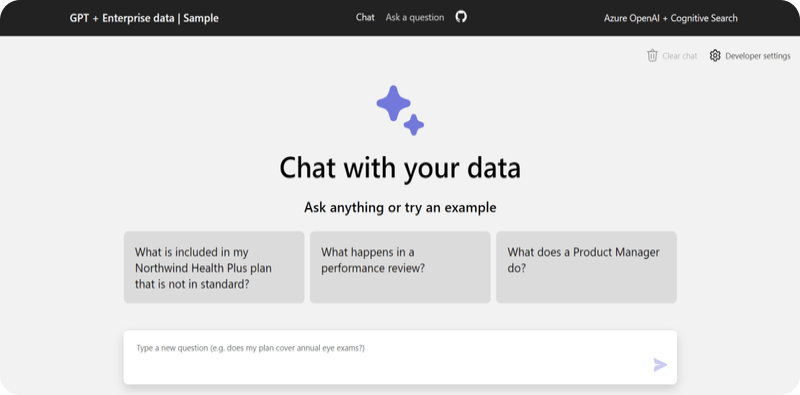
- ⚠️ No clear next step – Users landed on the screen and didn't know where to click first.
- ⚠️ Guiding questions didn't match reality – The AI's prompts reflected how developers thought, not how sales reps work.
- ⚠️ Accessibility issues – Low contrast and small targets made the demo difficult for some users.
- ⚠️ No way to use real files – Users couldn't upload their own documents, so they couldn't validate if the tool actually helped.
"I don't know where to start."
— Sales rep, during usability testing
Root Problem
The surface problem was confusion. The root problem was deeper: the flow didn't match the user's mental model.
A guided, predictable experience that builds trust.
The final design feels less like "using a tool" and more like working with a knowledgeable assistant. Every decision ties back to the four issues uncovered in testing.
Feature 1 — One-Click File Access
Solving: "No upload option meant users couldn't try it with real files"
Users can upload from desktop or choose from the enterprise document hub—no digging required. The entry point is immediate and obvious.
Feature 2 — Real-World Search Prompts
Solving: "Guiding questions didn't match reality"
Instead of generic AI prompts like "Summarize this," the system suggests role-specific queries derived from actual sales workflows, like "Find objection handling points for competitors."
Feature 3 — Side-by-Side Reading View
Solving: "No clear next step & Accessibility issues"
AI responses aren't trusted if they can't be verified. I designed a split-view interface where the AI insight highlights the exact source text in the original document, establishing immediate trust.
Unlocking the next phase of development.
The redesign transformed both user behavior and stakeholder confidence.
95% Task Completion
Task completion on core flow (up from 70%).
Hesitation Eliminated
Reps now click immediately without confusion.
Accessibility
Issues resolved through contrast & touch targets.
Business Impact
- The redesigned concept secured unanimous approval from sales leadership (the "Clinicians" review board).
- Project received greenlight to advance to the next phase.
- Foundation established for rollout to 2,600+ sales representatives.
"Finally—I know exactly what to do."
— Sales rep, post-redesign testing
More Projects